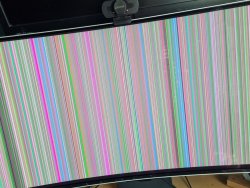
The problem for me slowly deterioirated, after resetting the settings I couldn't even use it at 240hz anymore. But anyway, I think I've fixed it.
Disclaimer: I'm not a Samsung employee, so use this at your own risk.
I downloaded firmware 1006.3 again and used a different USB stick that I reformatted as FAT32. I put the three files from the zip on it:
- M-C9349GGAA-1006.3[09E2].img
- 49A2ODYOC.bin
- 49A2ODYOCSUB.bin
And nothing else.
Then I renamed the 'M-C9349GGAA-1006.3[09E2].img' file to M-C9349GGAA-0000.0[09E2].img' as described here:
Reddit - Dive into anything
The monitor now allowed me to flash this firmware, even though the same (or newer) version was already installed. The firmware upgrade went a lot smoother than last time I tried it. Maybe the USB disk I used before was bad. After upgrading and resetting all the settings the monitor started working normally again. It runs at 240hz now without any problems. I haven't had a black screen yet. If that happens I can try to install v1002.2 that is also available for download. But I didn't want to mess too much with different versions.
Note: inside the monitor support menu it correctly says version 1006.3 is installed. I guess having the 0000.0 in the filename is just a backdoor that allows firmware developers to skip the version check process.





 . Kiitos vinkistä, seurailenpa nyt tuon tilannetta. Ainakin on speksit aikalailla kohdallaan nyt. Vai miten gen 3 näytöissä oleva teknologia vertautuu aikaisempiin? En jaksanut kaivella
  .
.